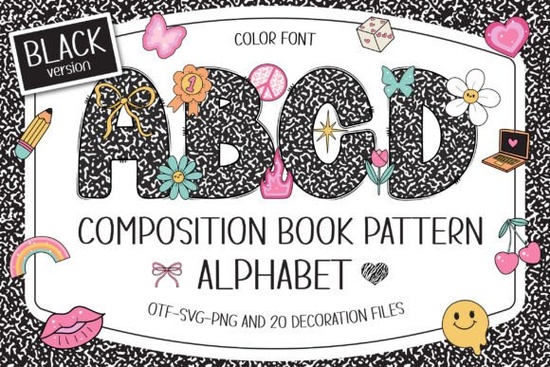
If you love that classic black-and-white marbled notebook cover, the Composition Book Pattern Font brings the same nostalgic feel into your digital designs. This typeface recreates the familiar speckled texture of old-school composition books, then pairs each character with 20 Y2K-style doodle cliparts that add a playful, early‑2000s scrapbook vibe. It’s a quick way to give sublimation prints, classroom decor, and paper crafts an instant layer of personality without hunting down separate graphic assets.
In the download you get both a solid black version and a color version with layered paint‑like fills. The black font is cut‑ready for vinyl projects, while the color OTF and TTF files add a pre‑colored, hand‑drawn look perfect for digital scrapbooking, printable wall art, or merchandise mockups. Each letter can stand alone as a design element thanks to the built‑in speckle pattern, so you don’t need a separate background to pull off the composition book look.
What exactly does this font pack include?
Inside the ZIP you’ll find:
- Black OTF/TTF – solid silhouette style that works with Cricut, Silhouette, and any standard cutting software.
- Color OTF/TTF – pre‑filled, multi‑color characters for use in design programs that support color bitmap or SVG‑style fonts (Photoshop, Illustrator, Inkscape, Silhouette Studio).
- 20 doodle cliparts as alternate glyphs – access stars, hearts, smileys, sparkles, and more through the glyphs panel.
- A quick‑start guide that points you to the Ultimate Font Guide on Creative Fabrica if you’ve never used a color font before.
Can I use this font with my Cricut machine?
The black version is fully compatible with Cricut Design Space. Because it’s a clean single‑color outline, Cricut can read the letters and send them to your machine for cutting or drawing. The color version, however, relies on embedded color data that Cricut cannot interpret. If you try to upload the color OTF to Cricut, the system will show a blank or default fallback font.
For crafters who work mainly with vinyl, iron‑on, or cardstock, stick with the black file. If you’re designing in Photoshop or Silhouette and then printing a full‑color sticker sheet or sublimation transfer, the color version is a huge time‑saver because you don’t have to recolor each letter by hand.
Which design programs support the color letters?
Programs that can display and edit color fonts include Adobe Photoshop, Illustrator, Inkscape (a free alternative), and Silhouette Studio (Designer Edition or higher). CorelDRAW and Affinity Designer may show the letters but often flatten the colors to black, so test before you buy. If your workflow stays entirely inside Cricut Design Space, you’re better off with the black file and adding your own colors through the color sync panel.
What projects work best with a composition book pattern?
This font shines when you want a handmade, “back‑to‑school” feel without literal notebook paper backgrounds. Here are some common uses:
- Classroom decorations: name tags, supply labels, bulletin board titles. Pair it with a bright rainbow school doodle font for a vivid, crayon‑box vibe.
- Sublimation gifts: personalized tumblers, tote bags, or notebooks. The black speckle stays crisp when pressed, and the doodles let you swap a standard letter for a star or heart on the fly.
- Scrapbook titles and journal covers: the Y2K doodles speak directly to early‑2000s nostalgia, making it easy to theme a memory book without hunting for separate clipart packs.
- Print‑on‑demand products: use the color version for t‑shirt mockups and pillow cases; the pre‑colored letters look like a design team already spent hours on them.
- Personalized party goods: birthday banners, favor tags, or cupcake toppers gain a hand‑stamped feel that plain fonts miss.
If you love mixing school‑themed alphabets, a rainbow school font adds a bright, cheerful companion for the covers of reading logs or math journals. For spring crafts and nature‑inspired layouts, a spring bee colorful font brings soft, sunny accents that contrast nicely with the black‑and‑white marble.
How do the Y2K doodle cliparts work in practice?
Each doodle is assigned to a specific alternate character slot, so instead of typing a regular “o” you can insert a cute smiley, or swap “i” for a sparkle. You access them through the glyphs panel in your software. In Photoshop, go to Window → Glyphs; in Silhouette Studio, use the text style panel; in Illustrator, open the Glyphs palette. This lets you sprinkle doodles exactly where you need them without leaving the font layer.
If you’ve never used alternate glyphs before, start by typing the whole word in your regular letters, then go back and selectively replace a few characters. A simple name like “Sam” can become “S★m” or “S♥m” in seconds.
Are there any printing or sublimation tips to keep in mind?
When you’re pressing the design onto a physical product, mirror your image if needed and use a high‑resolution export. The speckle is detailed, so set your DPI to 300 or higher so the dots stay sharp. If you’re cutting the black version from adhesive vinyl, go with a clean, medium‑tack mat and a fine‑point blade; the thin speckle lines weed easily if you go slow. For sublimation, print the color version directly onto your transfer paper the color OTF holds up well at heat‑press temperatures and the doodles won’t blur.
If you need something bolder for summer holidays, check out this patriotic font to round out a seasonal toolkit. And for those who prefer a full‑color composition look without using a separate color font, the colorful version of the composition book pattern gives you the same speckled texture with pre‑styled, retro painting fills ideal for digital planners and low‑effort social media graphics.
Quick Tip: If you’re new to fonts with extra characters, install both the black and color versions and then keep a test file open in your design program. That way you can quickly check which key launches each doodle, and you’ll get comfortable cycling through the alternates in a few minutes. The doodles are coded to standard lowercase and uppercase positions, so trying uppercase “K” might reveal a heart, while lowercase “k” could be a star trial and error is part of the fun.
Before you download, here’s a short checklist to get the most out of your new font:
- Pick your version: choose the black file if you’ll be cutting material, or the color file if you’re staying digital and your software supports it.
- Check your software: confirm that your program can read color OTF fonts (Photoshop, Illustrator, Inkscape, Silhouette are all safe bets).
- Open the glyphs panel: locate the 20 doodles and note which keys trigger them this takes about five minutes and saves time later.
- Test at different sizes: the speckle pattern remains readable from 12 pt all the way up to poster scale, but make a small test print to see how the texture behaves on your chosen paper or fabric.
- Combine cautiously: when mixing this font with other typefaces, give the composition book letters their own line or a generous margin so the speckle doesn’t compete with nearby text.
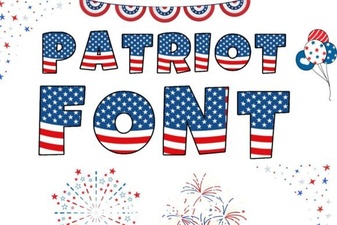 Patriotic Font Design Ideas for Creative Projects
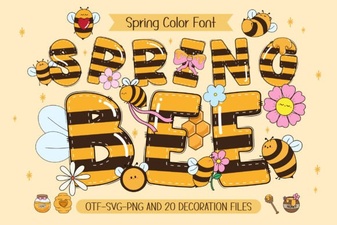 Spring Bee Font: Buzzing Design Ideas & Inspiration
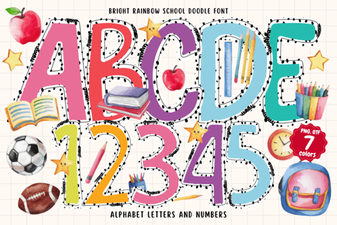 Bright Rainbow School Doodle Font for Fun Creative Projects
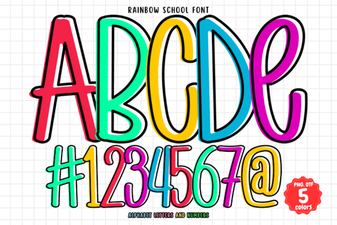 Rainbow School Font: Fun Designs for Creative Projects
 Cute Dinosaur Fonts: Free Downloads and Design Ideas
 Gervia Font: Creative Typography for Modern Design